 Support on Ko-fi




Home and Base: timers and buildings
Home tells you which builder is free and what finishes next. Base lists every building with the cost and time of its next level. After this chapter you can read each card, confirm finished upgrades, start the next one and set a reminder.
On this page
Read Home from top to bottom
Home is the first tab and shows the village selected at the top. To follow along without a village of your own, open the demo village.
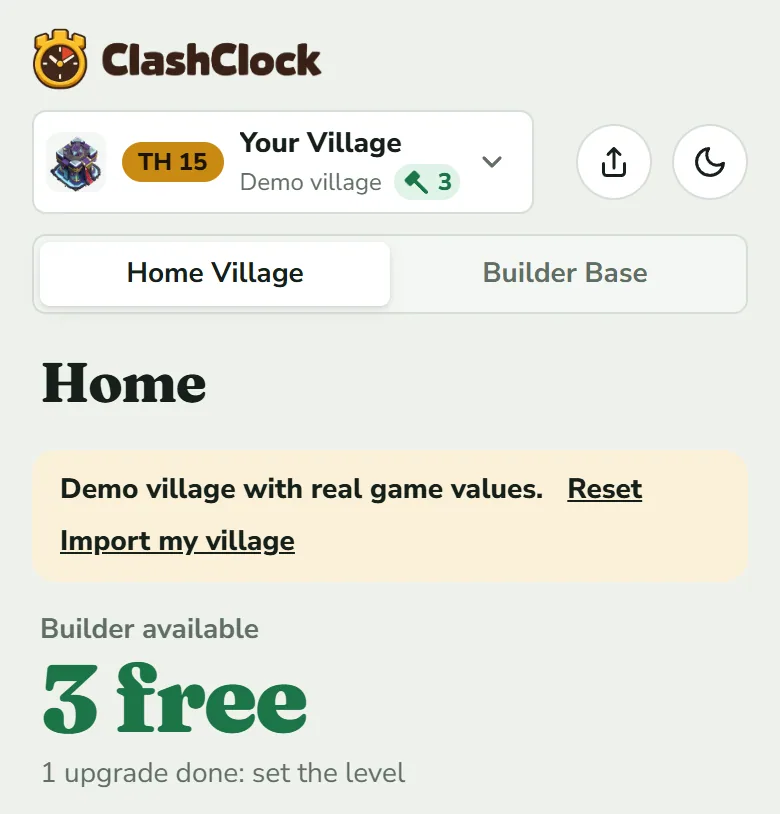
The header
- Village button: name, tag, Town Hall (TH 15) or Builder Hall (BH 9) level, and a hammer with the number of free builders. Tap it to switch villages (Import your village).
- Home Village | Builder Base shows the other half of the same account. Home, Base, Plan and Progress all follow this switch.
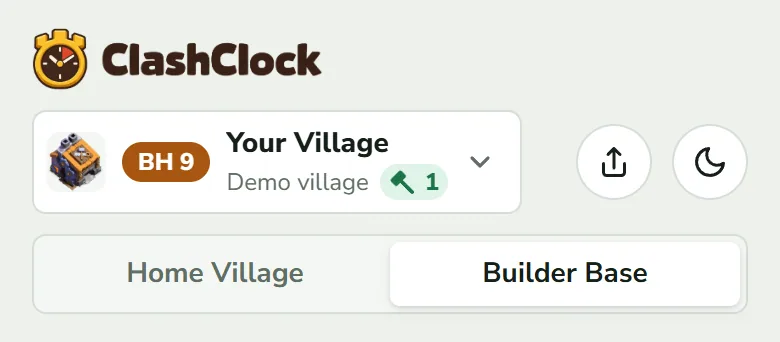
The big number
While a builder is free, the headline reads Builder available and, in green, N free. A builder counts as free the moment his timer runs out, even before you confirm it, because in the game he is already idle. Under the number you see either N upgrade done: set the level or Next one free in and the time until the next builder finishes.
When every builder is busy, the headline becomes Next Builder free in with the time left in large type, and under it when and on what (“at Mon 5:07 pm · Air Defense Level 13”). In the Builder Base the word is Master Builder.
Builders: one row per running upgrade
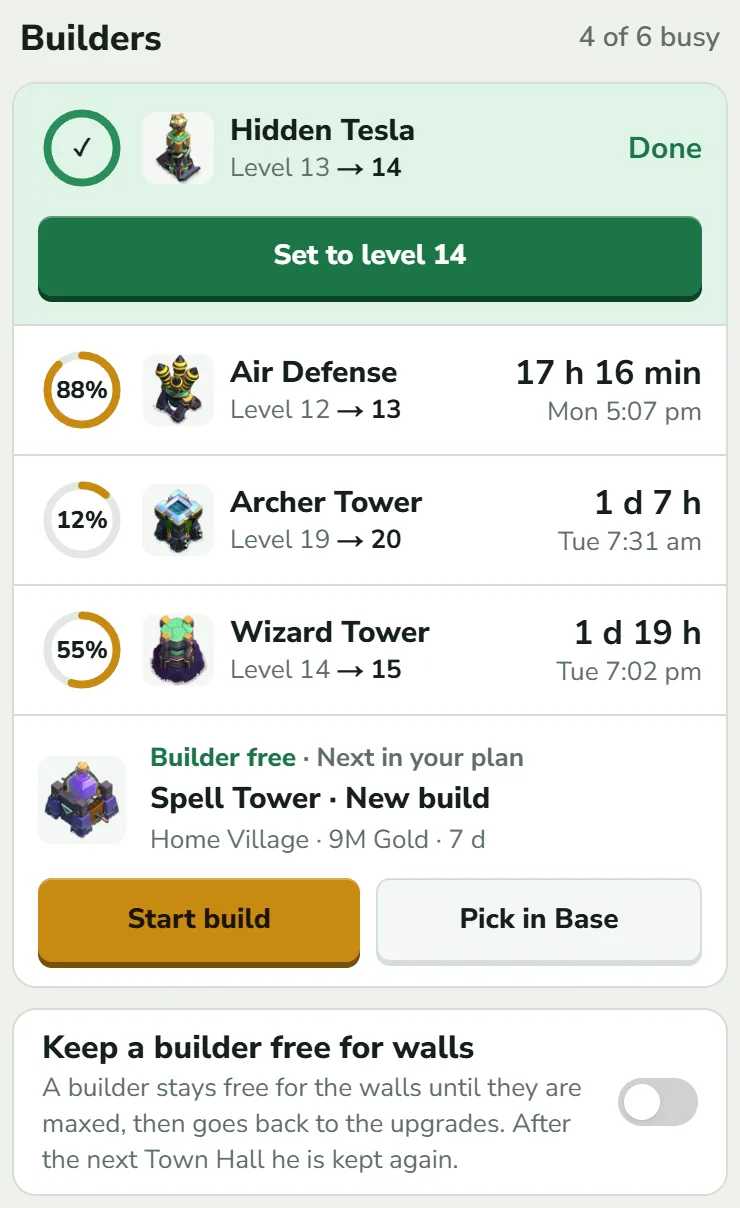
The heading Builders carries n of m busy. m counts your Builder's Huts, plus B.O.B. once his hut stands, and n how many of them are occupied. The Goblin Builder is never counted, and while the walls switch is on (below) and the walls are not yet maxed, m is one lower. Each row shows, left to right:
- a ring with the share of the upgrade done. A dash instead of a percentage means ClashClock does not know the run's length; the remaining time is still right.
- the building and Level 12 → 13.
- the countdown, and under it the day and time it finishes in your time zone.
A Goblin tag means the Goblin Builder is doing it. A crossed-out bell means its reminder is off. A green pill such as “✦ 10× until 6:40 pm” means a potion, helper or Clock Tower boost is running on it. The countdown then runs faster than the clock, as in the game; the finish time under it is the real moment.
Finished upgrades: Set to level N
ClashClock cannot see your game, so it only knows the clock. When a timer reaches zero the row turns green, shows Done and waits for you. Tap Set to level N to write the new level into your village and release the builder. Until you do, the headline counts him as free, but n of m busy still counts him as busy and nothing new can be started on him.
Finished it early with a book or gems? Tap the row, then Already done (book/gems), which does the same. Cancel in that sheet removes an upgrade you started here but not in the game, without changing the level. A gear-up, a Master Builder job on a Home Village defence, ends with Gear-up done (Builder Base and the 6th builder explains it).
Does the game show another time left? Open the row's sheet and use Adjust remaining time under the two buttons. When a timer looks wrong walks through it.
Start the next upgrade from Home
While a builder is free, the last row of the group is the plan's suggestion for him: Builder free · Next in your plan, the building and level (or New build), its price, and its time with your Gold Pass cut counted. The Laboratory and Pet House get the same row when free. Two buttons sit under it:
- Start upgrade (Start build for a building you have not placed yet, Start gear-up for a Master Builder gear-up) books the builder and starts the countdown in ClashClock. It does not touch the game: start the upgrade in the game first, then tap here. ClashClock does not check your storages; the game does. In the Home Village, if you entered a Balance, the price (with your Gold Pass cut) also comes off it.
- Pick in Base opens the Base tab so you can choose something else. With no suggestion, the row says so and offers only this button.
If the game shows another time for the same upgrade, a wrong Gold Pass percentage is the usual cause (When a timer looks wrong). The Plan tab explains how the suggestion is picked.
Laboratory and Pet House
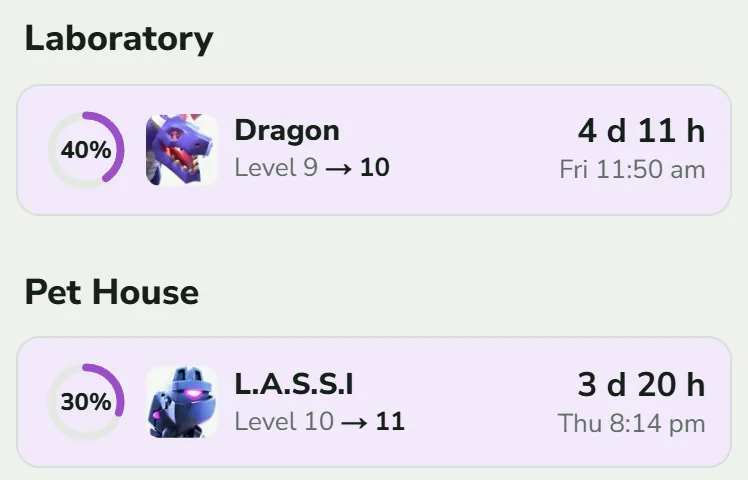
The Laboratory holds troop, spell and siege machine research. The Pet House appears once it stands (Town Hall 14 and up). Heroes use builders, not the lab. The Builder Base has the Star Laboratory instead. Rows work like builder rows: tap for the sheet, and Set to level N when the time is up.
Helpers
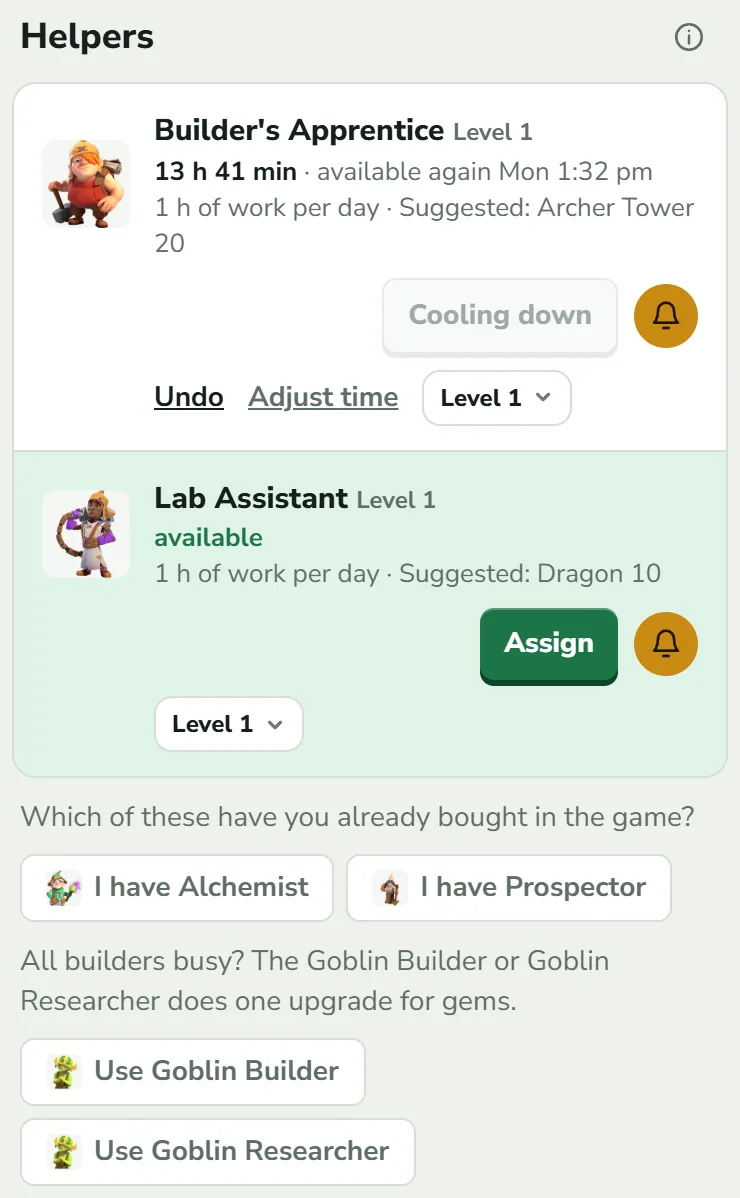
A helper has a card when your export lists it. Helpers it does not list can be switched on with a chip such as I have Alchemist. The Prospector exists only with the Gold Pass. The Builder's Apprentice and Lab Assistant work on one upgrade for an hour and add their level's hours of work. Tap Assign; the button turns into Cooling down. Alchemist and Prospector are plain timers: tap Used. All four helpers share one 23-hour work day that starts with the first one you use, so a second helper used while the first is cooling down comes back at the same moment as the first.
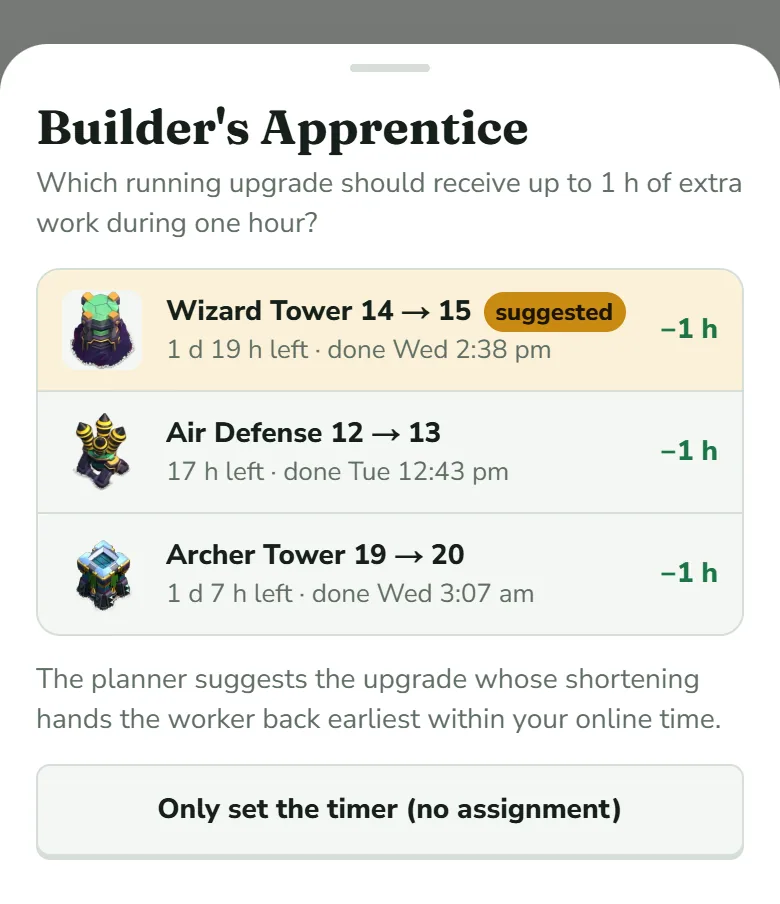
With only one upgrade running, Assign puts the helper on it at once. With several, a sheet lists them with the time each has left, and the planner's pick comes first with a gold suggested tag. Only set the timer (no assignment) starts the cooldown without touching any upgrade. With nothing running, the sheet says so and offers only that button.
Wrong tap? Undo takes the use back, Adjust time sets the “available again in” time the game shows, and the Level menu sets the helper's level. The Goblin Builder and Goblin Researcher are temporary extra workers that turn up in the game now and then. When you use one, tap Use Goblin Builder or Use Goblin Researcher and pick the upgrade: it runs for gems without taking a builder or the lab, and its row carries the Goblin tag.
Reminders
Tap an upgrade's row to open its sheet. Reminder is the last block, under the buttons, and offers Off, when finished, 5 min before (the default), 15 min before and 1 h before. Helpers and the Clock Tower have a bell instead. With ClashClock open, a reminder appears as a message at the top, such as “Hidden Tesla level 14 is done”. To be reminded with the app closed, turn on push in Profile: reminders, sync and install.
Other cards on Home
- Use now: a green card when the plan wants a potion used now. Used it logs it, Not now hides it for an hour. Running potions and snacks show as green rows with +1, Remove boost and Adjust time (Gold Pass, potions and magic items shows one). Farm now appears only when farming is on in the Plan tab.
- Balance: what your storages hold. Optional; figures you enter count for 12 hours.
- Keep a builder free for walls: a switch under Builders. It needs at least two builders and is greyed out with fewer. While it is on, one builder is kept for the walls and not counted until they are maxed (he is kept again after the next Town Hall), and a Walls card appears. To turn it off, tap Stop keeping a builder free at the foot of that card.
- Gold Pass: asks Gold Pass or F2P (free) once, then goes away. The Plan tab holds the answer.
- At the foot: Potions & snacks, Ore calculator and Update village.
The Builder Base on Home
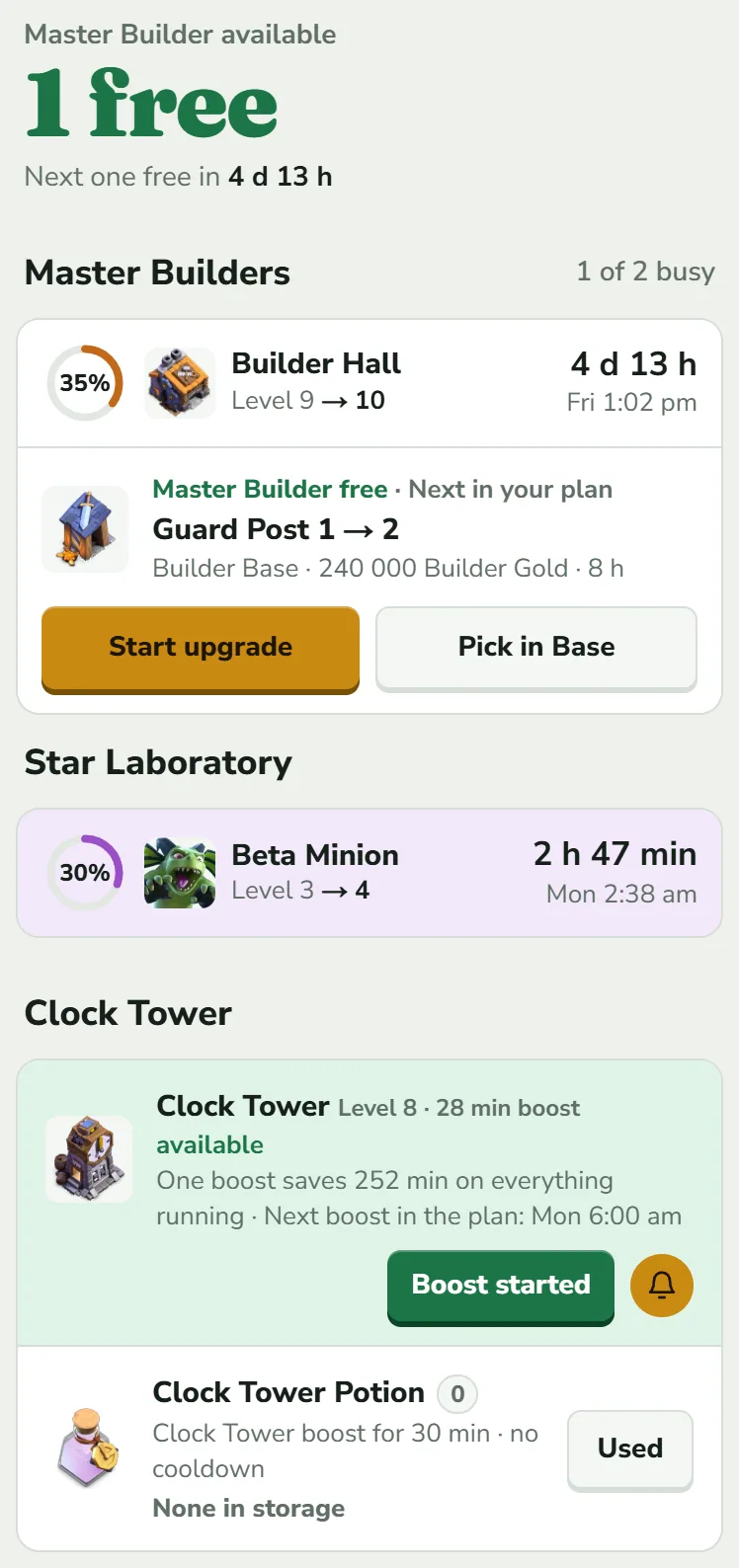
Switch to Builder Base at the top. Master Builders lists the Master Builder, O.T.T.O. once his outpost stands, and B.O.T.O. if you bought him with gems; Star Laboratory is the lab. The Clock Tower card shows its level, whether it is available or cooling down, and what one boost saves. After you use it in the game, tap Boost started: every running Builder Base upgrade then runs at 10× for the boost length. ClashClock assumes a 22-hour cooldown, a number it could not confirm (How ClashClock works lists it among the limits). Bought B.O.T.O. after your last export? Tap + B.O.T.O. More in Builder Base and the 6th builder.
The Base tab: every building and its next level
Base is the catalogue of the active village. At the top it names the hall (Town Hall 15) and gives a percentage such as 89 % of a maxed TH 15. That share counts levels reached, not time or cost, and leaves out walls and the hall's own next level. Under it is what is left to max at this Town Hall: the time (“maxed in ≈ 9 mo”) and the total price per resource.
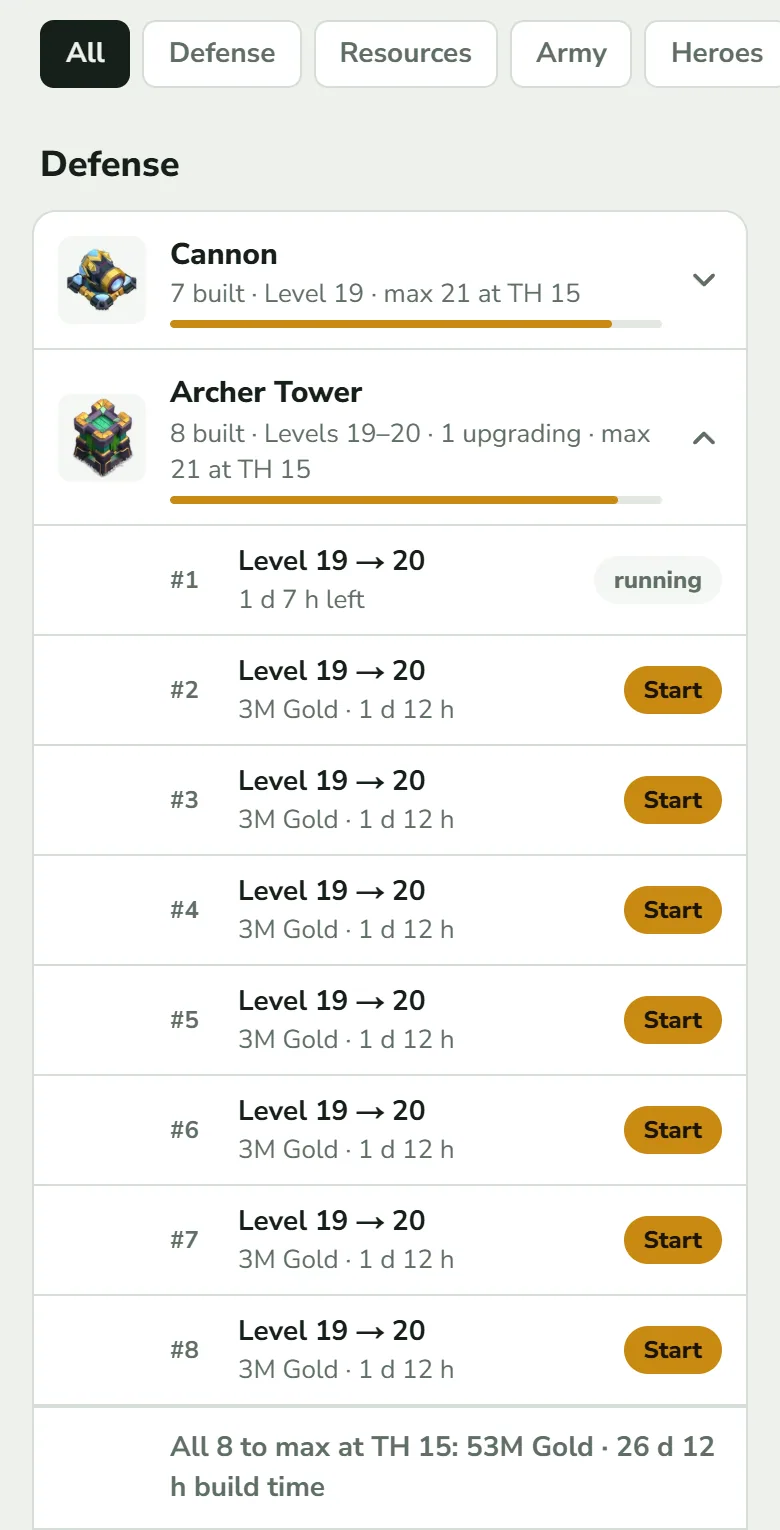
The chips All, Defense, Resources, Army, Heroes, Equipment, Lab, Traps and Walls filter the list. Each building is one row: how many you have, their level range, how many are upgrading and the highest level your Town Hall allows (“8 built · Levels 19–20 · 1 upgrading · max 21 at TH 15”). Tap a row to open the group:
- one line per copy (#1, #2 …) with its level, the cost and time of the next level (“2.6M Gold · 1 d”) and a Start tag, gold while a worker of the right kind is free and grey when not. running replaces it while that copy upgrades.
- buildings your Town Hall allows but you have not placed show as New build. assumed next to a level means the export did not list that building, so ClashClock assumed a level; set the real one in its sheet.
- at the bottom, the price and build time to max every copy at this Town Hall. Walls get one summary row at the very end; they are not started from here.
The building sheet
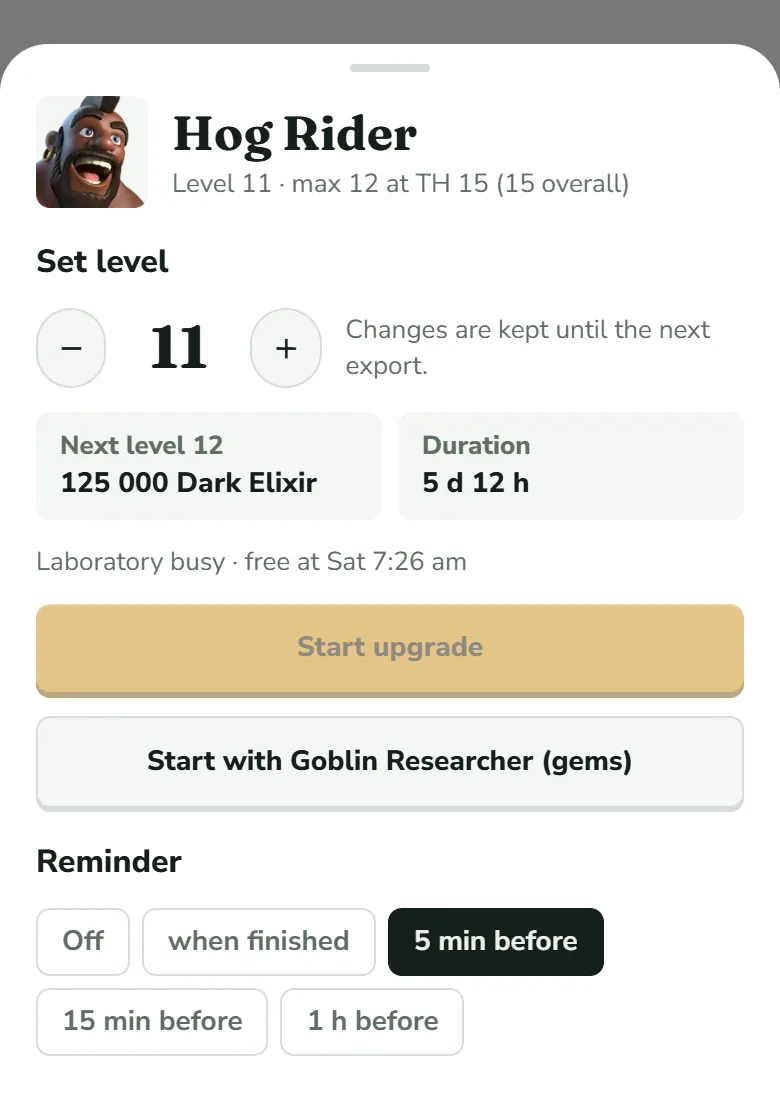
Tap a copy to open its sheet. Under the name you see the level, the highest level your Town Hall allows and, in brackets, the highest level the building reaches at any Town Hall when that is higher. A building with several copies also says which one you opened (“1 of 8”). Set level with − and + corrects a level by hand (“Changes are kept until the next export”). Next level and Duration show the price and time with your Gold Pass cut, and the time carries the percentage while a cut applies; Requirement appears when you need a higher Town Hall. Start upgrade (Start build for a new building) starts the countdown in ClashClock only.
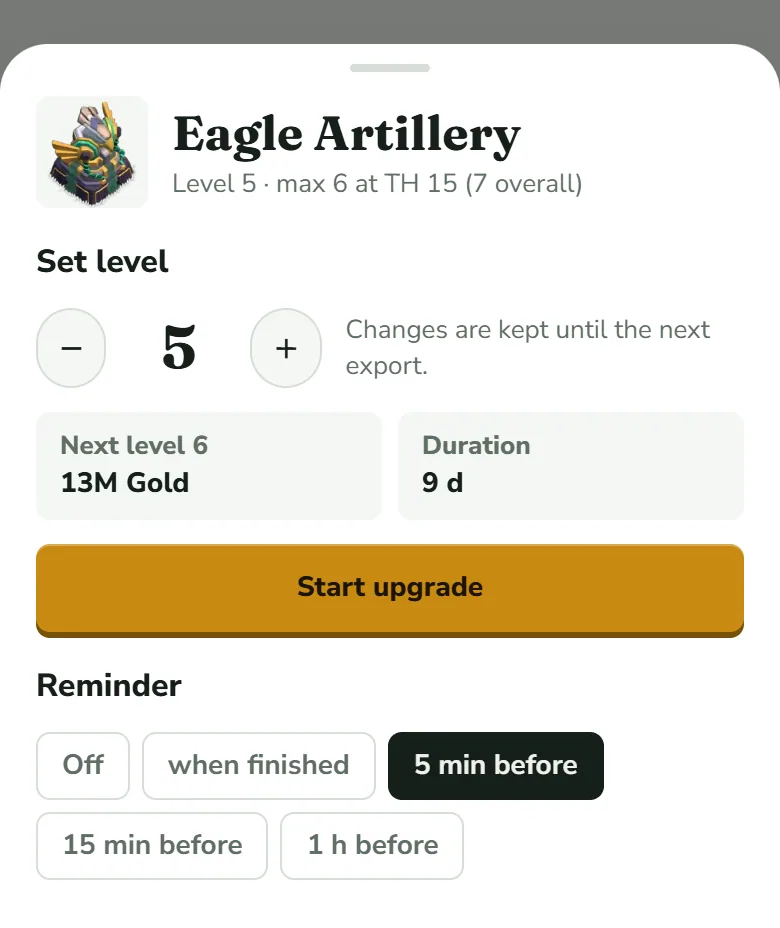
The button is greyed out while no worker of that kind is free, and says why above it (“No builder free · next one at …”, “Laboratory busy · free at …”, “Pet House busy · free at …”), or when the Town Hall is too low (“Start upgrade (from TH 16)”, with the requirement shown as a third box). In the Home Village, Start with Goblin Builder (gems) appears underneath while all builders are busy, and Start with Goblin Researcher (gems) while the Laboratory is.
Next, let the planner order what the builders start.
The Plan tab: your upgrade timelineTry it on your own village
Paste your village export and everything in this guide works on your own builders, timers and plan. It is free, needs no account and runs in the browser.
Useful? Help keep ClashClock running.
ClashClock is built and run by one person. Support on Ko-fi pays for the hosting, the database and the reminders it sends.