 Support on Ko-fi




Import your village
ClashClock cannot see your game account, so it learns your village from an export that the game writes for you. After this chapter you can import a village, add another one, update it after you have played, and fix the usual import errors.
On this page
Why ClashClock needs an export
ClashClock is an unofficial fan project and is not connected to your game account. It never sees your Supercell ID or password and cannot start or finish anything in the game. Most of what it knows about your village is text that you paste in. The game writes that text itself: every building, trap, wall, troop, spell, hero, pet and piece of equipment with its level, every running upgrade with its time left, your helpers, and the same for the Builder Base.
The export is a snapshot. It is exact at the moment you tap Copy and says nothing about what happens afterwards, so copy it right before you paste it and import again after a long session. ClashClock reads the pasted text in your browser and does not upload it. Looking up your player tag with the game's API, to fetch your name, league and clan, sends the tag together with your sign-in session or, without an account, an anonymous guest id after a security check (How ClashClock works lists everything that leaves your device). If you sign in, your villages also sync to your account (privacy policy).
Import your village step by step
Open Settings in the game
In the game, open Settings and tap More Settings.
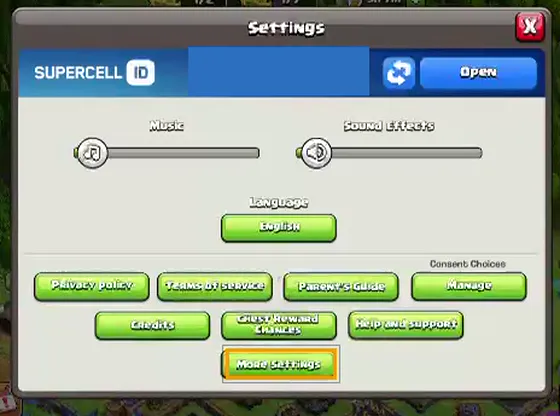
Tap More Settings, the button with the orange frame. Copy the village data
Scroll to the bottom of More Settings. Under Data Export, on the row Export Village data in JSON format, tap Copy. The game answers “Village data copied to device clipboard!”. Your phone keeps the copy while you switch apps.
The loop shows the whole way: Settings, More Settings, down to Data Export, then Copy. Open ClashClock and tap Paste export
Open the tracker. With no village saved, Home offers Paste export (the gold button) and See a demo village. If you already have a village, add another one from Profile with Add village under My villages.
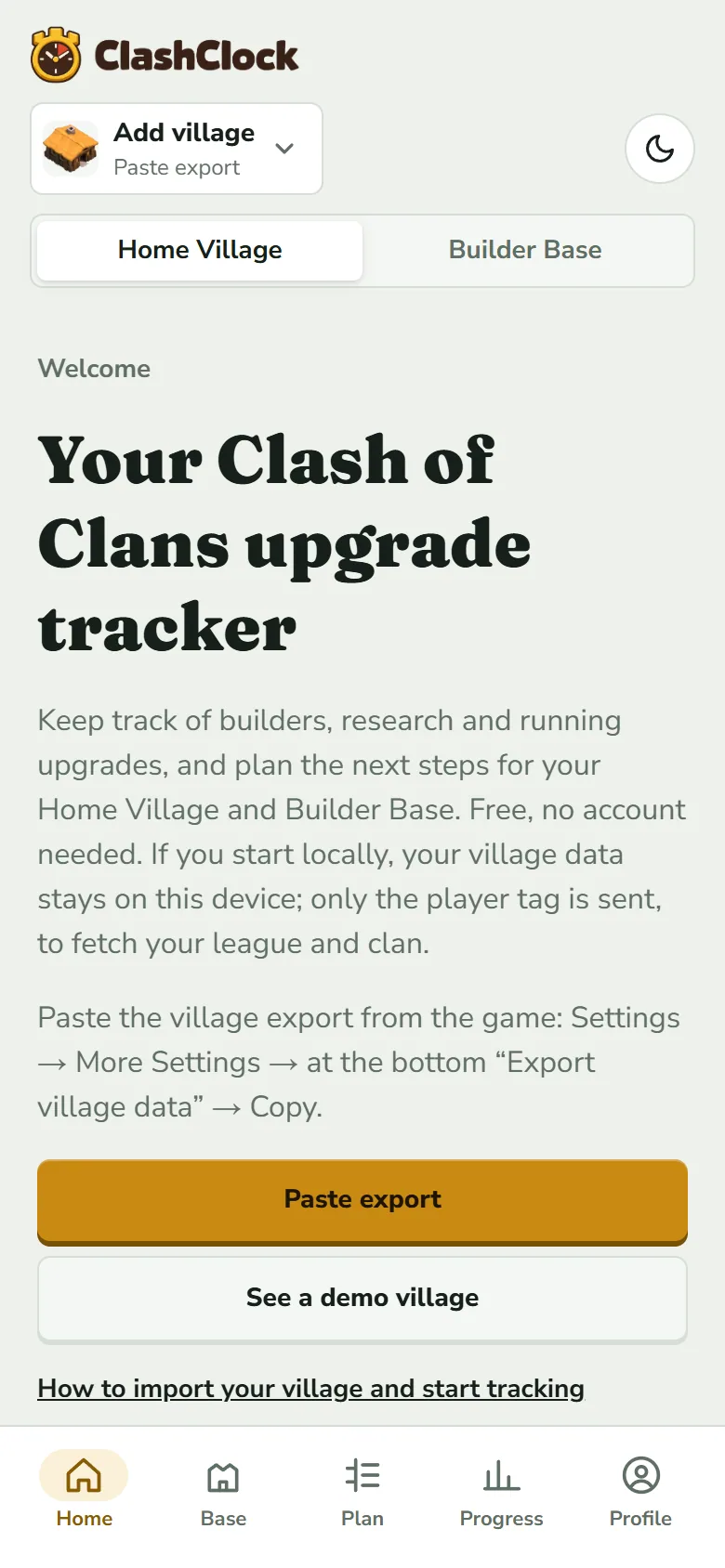
Paste export opens the import sheet. The village button at the top reads Add village because nothing is saved yet. Paste the export
The sheet is called Add village. Tap From clipboard; your browser may ask whether ClashClock may read the clipboard, so allow it. If the field stays empty, press and hold in Export (JSON) and choose Paste. You can type a Name for the village. Left empty, ClashClock uses your player tag and swaps in your player name when the game's API answers.
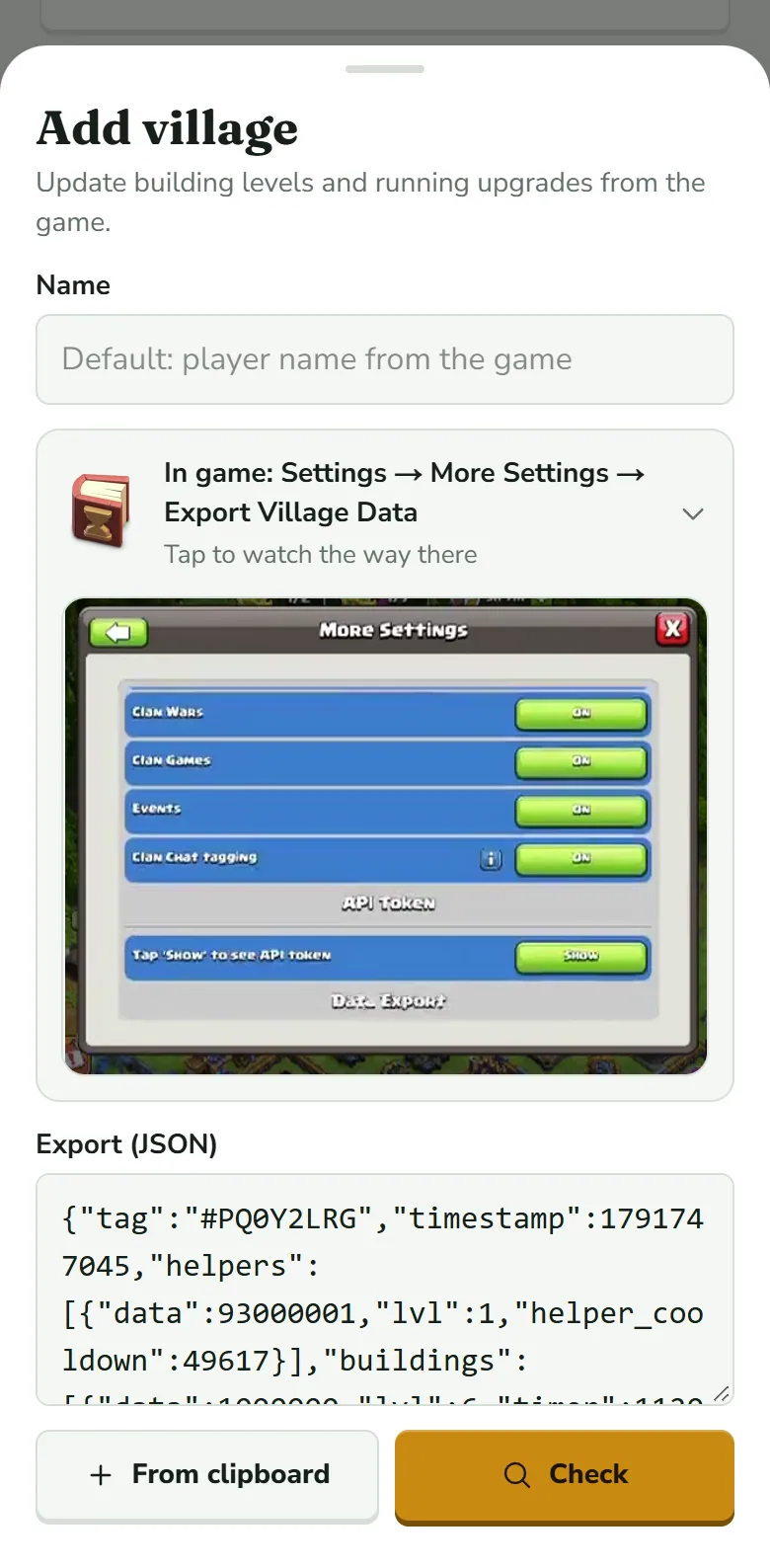
The pasted text starts with your tag. Check turns gold once the field is not empty. The walkthrough above the field replays the path in the game. Tap Check
Check reads the text and shows what it found. Nothing is saved yet. If you change the text afterwards, the button goes back to Check.
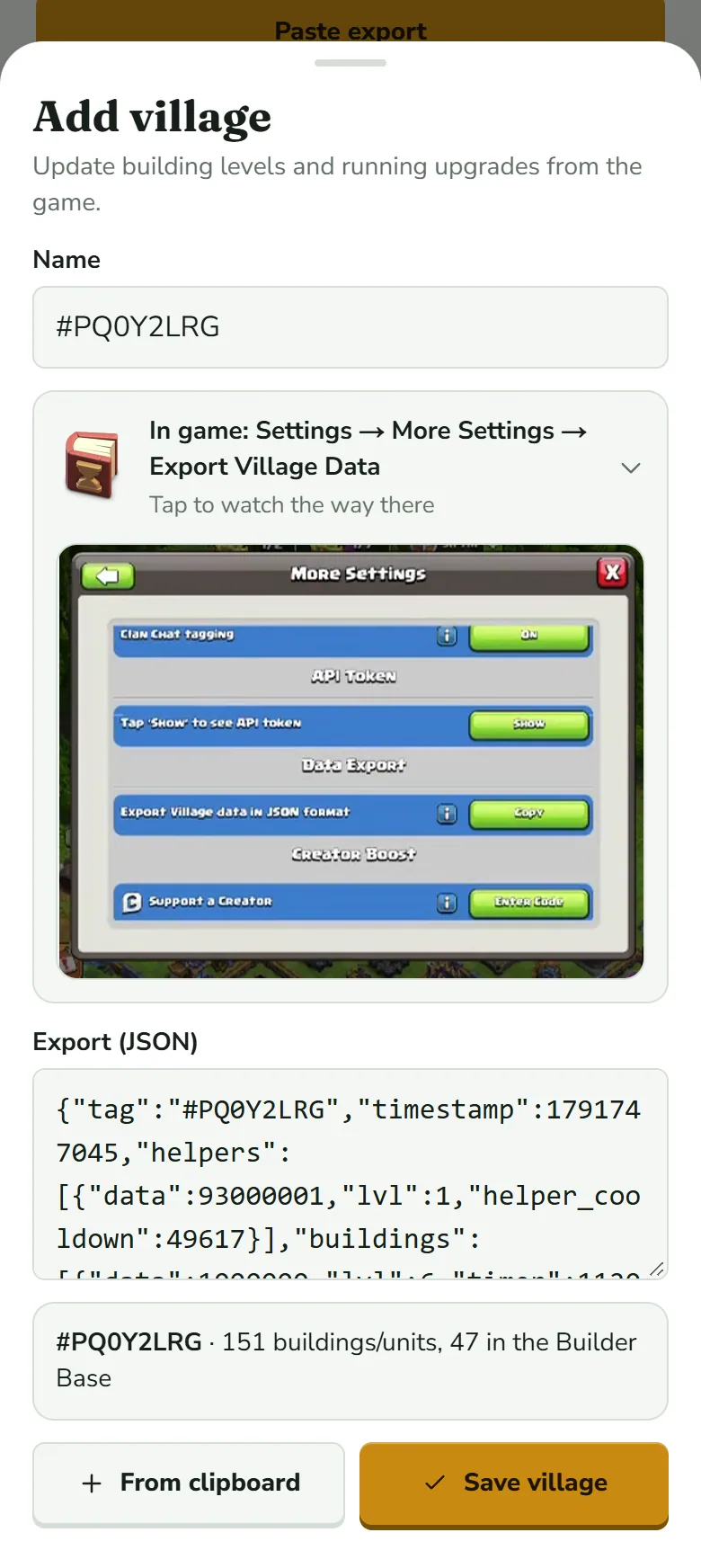
The result line gives the tag and how many entries were read in each village. The button has turned from Check into Save village. Save village
Compare the tag with the one on your in-game profile, then tap Save village. The sheet closes, a “Village added” message appears and the new village becomes the active one.
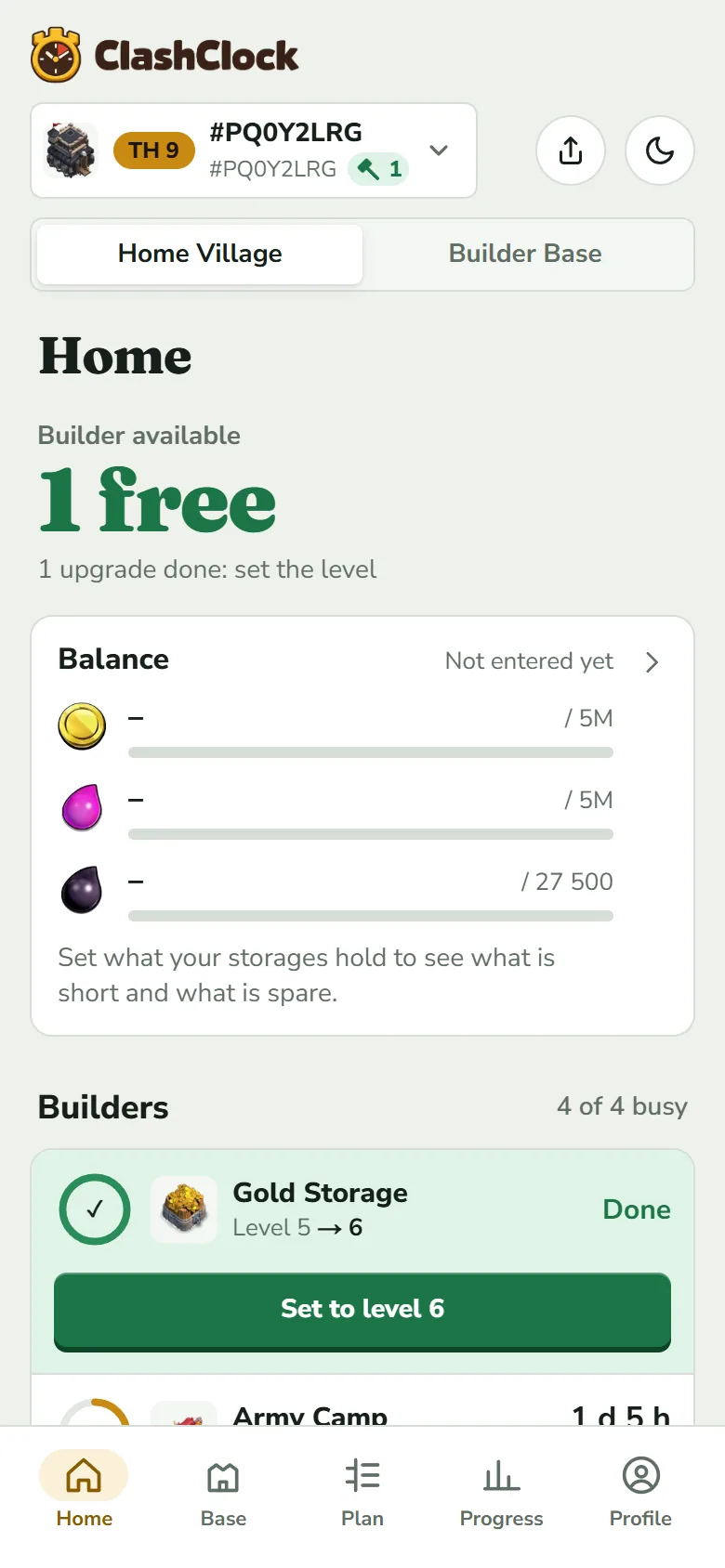
The Gold Storage's timer ran out after this export was taken, so it waits for Set to level 6. Home and Base explains why.
What the check line and the notes mean
The line under the field counts what was read: buildings, traps, troops, spells, siege machines, heroes, pets and equipment, for the Home Village and the Builder Base. Walls are stored by level and are not in the count.
A line n notes appears when something in the export has no match in ClashClock's game data: an id it does not know, a level above the highest one it has data for, or a timer longer than that level's known build time. Tap it to read them. They are not errors. The entry is kept and you can still save. They usually mean the game changed faster than ClashClock's data; How ClashClock works explains how the data is kept current.
What the game's API adds
Every saved village has a player tag, and ClashClock can ask the game's official API about it. What comes back depends on whether you are signed in.
- With an account (free, see Profile: reminders, sync and install), heroes, laboratory research, pets, equipment and both hall levels come from the API when you save, and again about once a day when you open the app. A message “Updated from the game” says how many changes it made. In a saved village, the fold-out Or refresh heroes and research from the player profile has Update now; the server reads one tag at most once every 10 hours.
- Without an account, a quiet security check lets the app look up your player name, league and clan for up to five player tags, and no levels. The lookup can be refused once the day's guest lookups are used up.
- Never: buildings, walls, traps, helpers and running timers. Only the export has them, so the export is how you start and how you reset.
More than one village
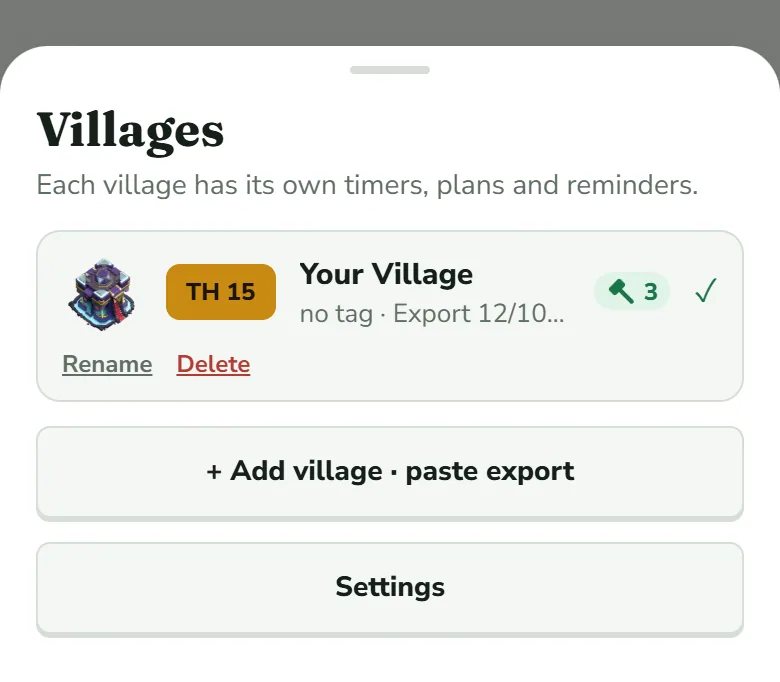
Each village keeps its own timers, plan and reminders. Add the next one with the same steps: Profile → Add village, or tap the village button at the top and then + Add village · paste export. That button also switches villages. It opens the Villages sheet, where the active village carries a tick and every row has Rename and Delete; Delete asks you to confirm.
Import again after you have played
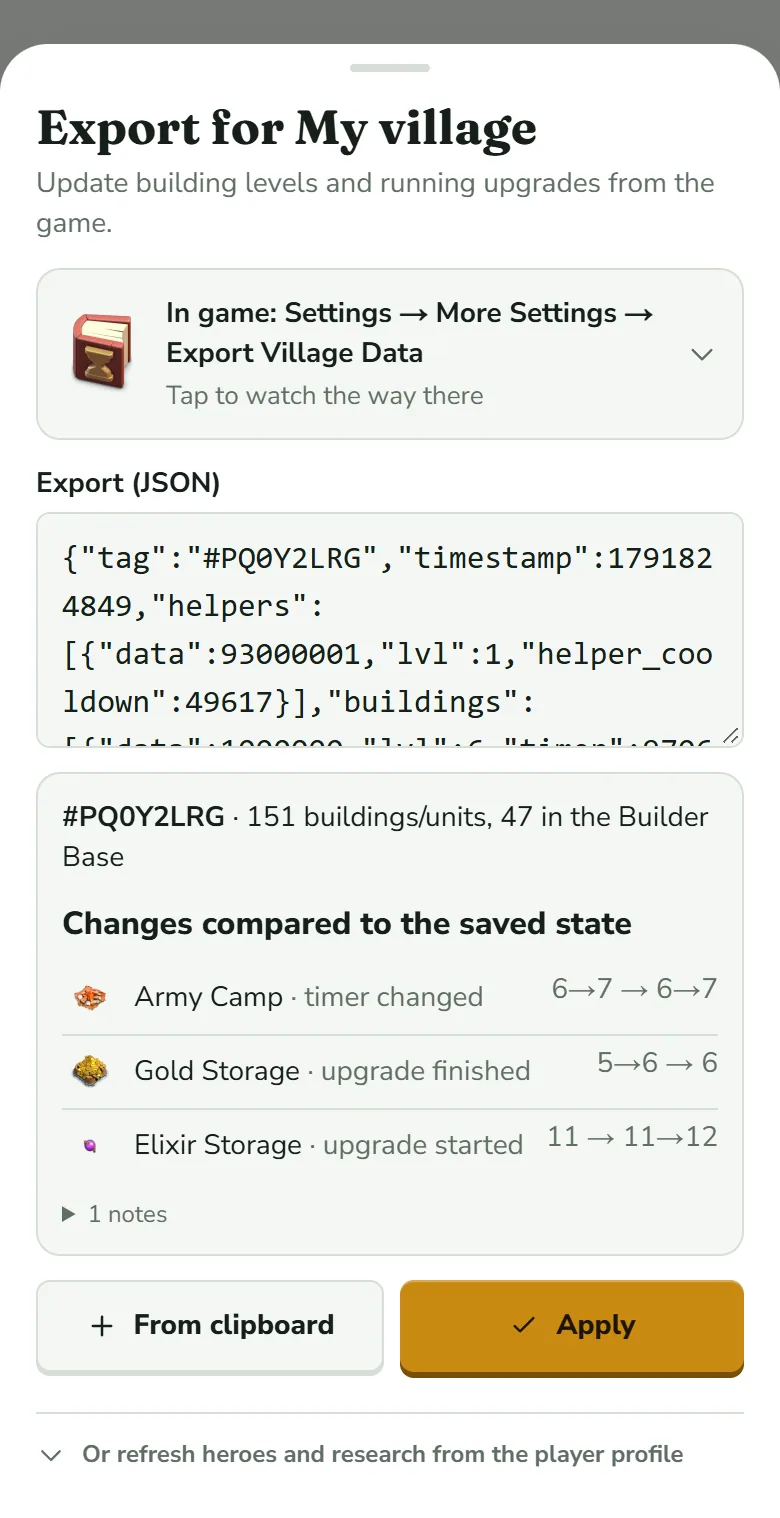
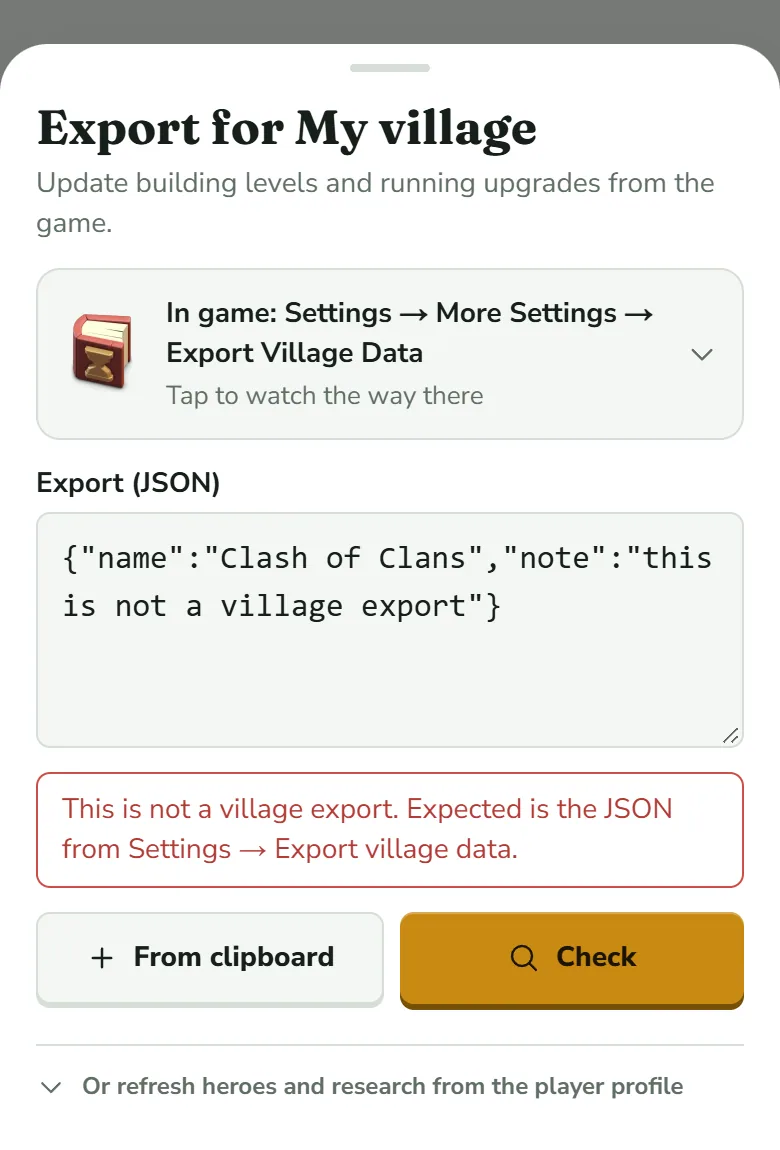
Import again when the game and ClashClock drift apart, and after a long session. Open Update village, the row at the foot of Home (it says “as of” and the day you last imported), or the matching icon at the top of the Plan tab. The sheet is titled “Export for …” with your village's name and has no Name field. Paste, tap Check, read the list, then tap Apply.
Changes compared to the saved state lists every difference building by building. The figures on the right read “what ClashClock had → what the export says”. A plain number is a level; 5→6 is an upgrade from level 5 to level 6 that is still running, so 5→6 → 6 is an upgrade that has finished. The box scrolls when it holds more rows than fit. After the building's name, each row carries one of these labels:
- level changed, upgrade started and upgrade finished: what you did in the game since the last import.
- timer changed: the same upgrade, but the game's finish time differs from ClashClock's by more than five minutes, or the target level is another one. This row is how you find out which timers had drifted. For a building the figures are levels, not times, so both sides can read the same, such as 6→7 → 6→7: only the finish time moved.
- timer dropped: ClashClock had a timer running, the game shows the building idle at its old level. Typical cause: you started the upgrade here but never in the game.
- gear-up running, gear-up done, new, removed and walls. A gear-up is a Master Builder job on a Home Village defence (Builder Base and the 6th builder explains it).
The export wins for levels, counts, walls and running upgrades. Everything it knows nothing about stays: your plan (steps that are done or running drop out and the rest move up), the reminder you chose per upgrade and helper, the Gold Pass answer, potion and magic-item counts, helpers and a Builder Base builder you added by hand, and your offline hours.
Try the demo village first
See a demo village on the welcome screen, or the demo link, loads “Your Village”, a Town Hall 15 village built from real game values. Its banner offers Reset, which rebuilds the demo, and Import my village. Your own village is added beside the demo, not over it; delete the demo under Profile → My villages when you are done.
What an export does not contain
- Your Gold Pass or free-to-play status. Home asks once, and the Plan tab holds the Builder Boost and Research Boost percentages.
- Potions, snacks, books and hammers: what you own and what runs now. You log them.
- Resources and gems in your storages. The optional Balance card on Home takes what you type.
- Helpers beyond those the export lists: Home offers I have Alchemist and I have Prospector.
- A Builder Base builder you bought after the export: + B.O.T.O on the Builder Base side of Home.
- Boosts that were running when you copied it. ClashClock does not read them, so an export taken during a potion or helper boost can show a timer that is off. Copy after the boost ends, or correct the timer (When a timer looks wrong).
- Your offline hours, events and goals: you enter them in the Plan tab.
If the import fails
| What you see | What it means | What to do |
|---|---|---|
| Clipboard not readable. Please paste the text manually. | The browser did not let ClashClock read the clipboard. | Press and hold in the Export (JSON) field and choose Paste. |
| An error such as “Unexpected token … is not valid JSON” | The field holds something that is not a complete export. The wording comes from your browser. | Copy again in the game and paste the whole text. |
| This is not a village export. Expected is the JSON from Settings → Export village data. | The text is valid JSON but lacks the timestamp or the list of buildings that a village export has. | Copy from Data Export, on the row Export Village data in JSON format. |
| Check is greyed out | The Export (JSON) field is empty. | Tap From clipboard or paste by hand. |
| Many upgrades show Done | The export is old: the timers ran out after you copied it. | Copy a fresh export, or tap Set to level on each. |
| The village is named after its tag | The game's API has not answered and you typed no name. | Rename it under Profile → My villages. |
| Hero or laboratory levels lag the game | Without an account, levels come only from the export. | Import again, or sign in. |
Before you plan
- The export was copied after your last upgrade in the game.
- The tag in the check line matches your in-game profile.
- No row on Home still waits for Set to level N.
- The Gold Pass card on Home is answered: Gold Pass or F2P (free).
- Helpers you own are switched on with I have ….
- Your sleep and work hours are entered on the Plan tab (The Plan tab).
Village saved? Next, read what Home is telling you.
Home and Base: timers and buildingsTry it on your own village
Paste your village export and everything in this guide works on your own builders, timers and plan. It is free, needs no account and runs in the browser.
Useful? Help keep ClashClock running.
ClashClock is built and run by one person. Support on Ko-fi pays for the hosting, the database and the reminders it sends.