 Support on Ko-fi




The Plan tab: your upgrade timeline
After this chapter you can pick a strategy, tell ClashClock when you cannot play, read the timeline and the queue, and change a plan without breaking it. You will also know what each forecast date means and why a step sits where it does.
On this page
What the Plan tab does
The Plan tab is a schedule of every upgrade still ahead of you. Each builder, the Laboratory and the Pet House has a lane, and each step in a lane has a start and a finish time. The planner never starts a step while you are offline, and it works out when the next Town Hall, or a maxed village, arrives. It recalculates once a minute and after every change you make.
It only plans. ClashClock cannot start an upgrade in the game, so you start each step in the game yourself and then tell ClashClock, on Home or with Start build or Start upgrade in the step's sheet. How the planner chooses is explained in How ClashClock works.
On a phone the tab has up to three views: Schedule (the strategy and the plan), Builders (only in an Own plan) and Forecast (dates, Gold Pass, offline hours, costs). On a wide screen the Schedule and a Forecast panel share one page, with the lead date pinned above the panel.
First visit: three things to check
Read the card
How your plan works gives the basics in three lines. Got it hides it for good on this device. Re-Engagement Boost is for players back after a long break (boosts chapter).
Answer the Gold Pass question
On Home, the Gold Pass card asks whether you play Gold Pass or F2P (free). Until you answer, the plan assumes no pass. You can change it later in Forecast.
Check your offline times
A new install has one entry, Sleep, every day from 11:00 pm to 6:00 am. Change it to your real hours, as described below.
Pick a strategy
The buttons under Strategy decide who chooses the steps. A new village starts on Strategic rush. The sentence under the buttons changes with them, and its (i) opens the long version.
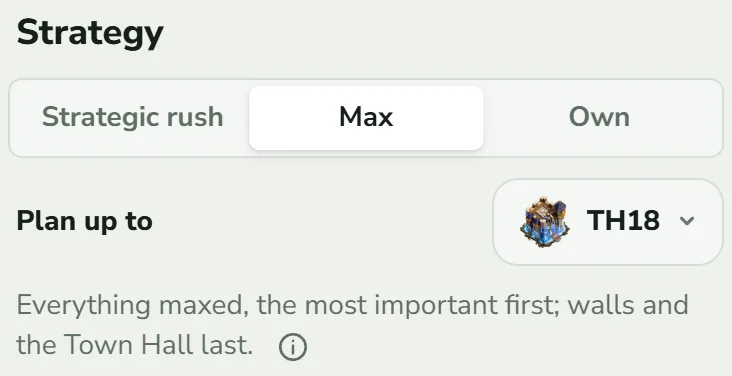
| Button | What the plan does | What it leaves for last |
|---|---|---|
| Strategic rush | What the game demands for the next Town Hall (new buildings, the Hero Hall, storages), then the hall. A builder that would wait fills the gap with the most useful step it can finish in time: Army Camps, Clan Castle, Laboratory and Pet House, then heroes. | Defences. Collectors and mines are never upgraded. |
| Max | Everything of the hall maxed, the most important first: new buildings, then Army Camps, Clan Castle, Laboratory and Pet House, then heroes and key defences. | Walls; the Town Hall overlaps final upgrades |
| Own | Only the steps you add, in your order, on the builders you choose, plus what the game demands before a Town Hall you added. | Whatever you do not add |
Which is faster depends on what you mean. In ClashClock's simulation, counted from the start of a hall, a rush stands on the next Town Hall in 9 to 16 days and Max in about 100 to 300. At Town Hall 14 the rush leaves 93% of the old hall's builder work undone (the numbers). The 6th-builder strategy has its own chapter: Builder Base and the 6th builder.
Plan up to a Town Hall
Plan up to sets the last hall the plan climbs to. It appears for Rush and Max in the Home Village and lists every hall from the next one to the newest (TH18 · newest in the demo). Rush ends once that hall stands: “The plan ends once TH16 stands.” Max maxes every hall up to it and stops.
Tell the plan when you are offline
A builder that frees up at 3 am waits until you are back, and that wait is what ClashClock calls idle time. With your real hours entered, the planner prefers long upgrades that span the night.
Open the list
Go to Forecast and tap Offline times. The row shows your first entry, with +1, +2 and so on when there are more.
Add or edit
Tap an entry, or Add offline time. Sleep repeats every day. Work repeats on the weekdays you tick (Monday to Friday to start with). Away is one stretch with a start and an end, for a trip. Set From and To, which may run past midnight, and tap Save.
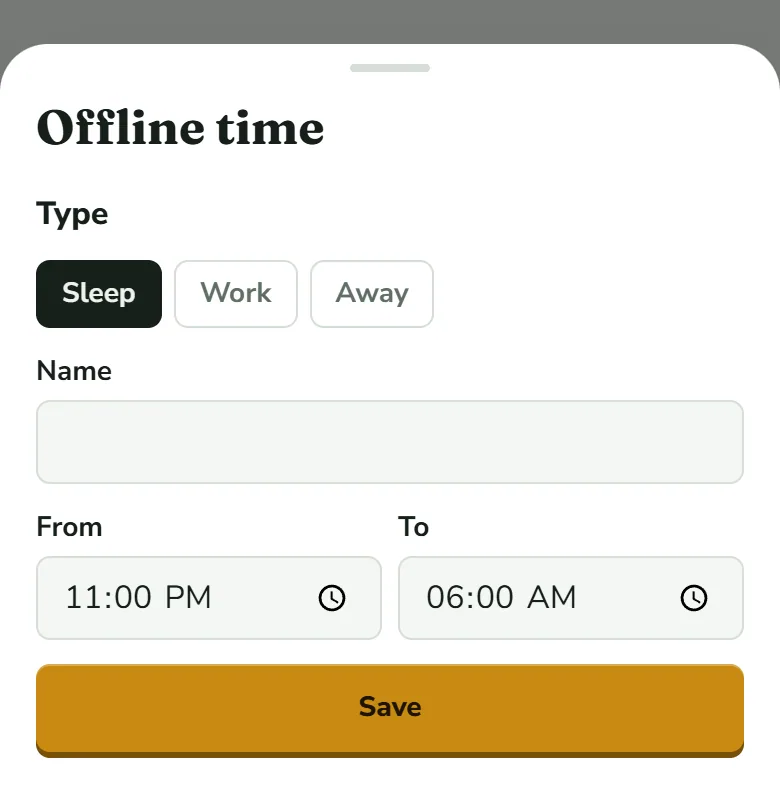
Work adds a row of weekdays; Away swaps the times for a start and an end date. Check the time zone
The list ends with “Time zone: … · Adjust”. Your hours are read in that zone.
Offline hours are shared by every village on the device and show as grey columns on the timeline. They matter less than you might fear: in the simulated villages, with eight hours of sleep and the planner choosing the order, builders stood idle for between 0.1% and 0.3% of their time (what sleeping costs your builders). Your own village will differ, and the Idle · 7 days row in Forecast counts only the coming week.
Read the schedule
Schedule shows one plan two ways, switched at the top of its card: Queue and Timeline. A phone opens on Queue and a wide screen on Timeline.
Queue: what to do next
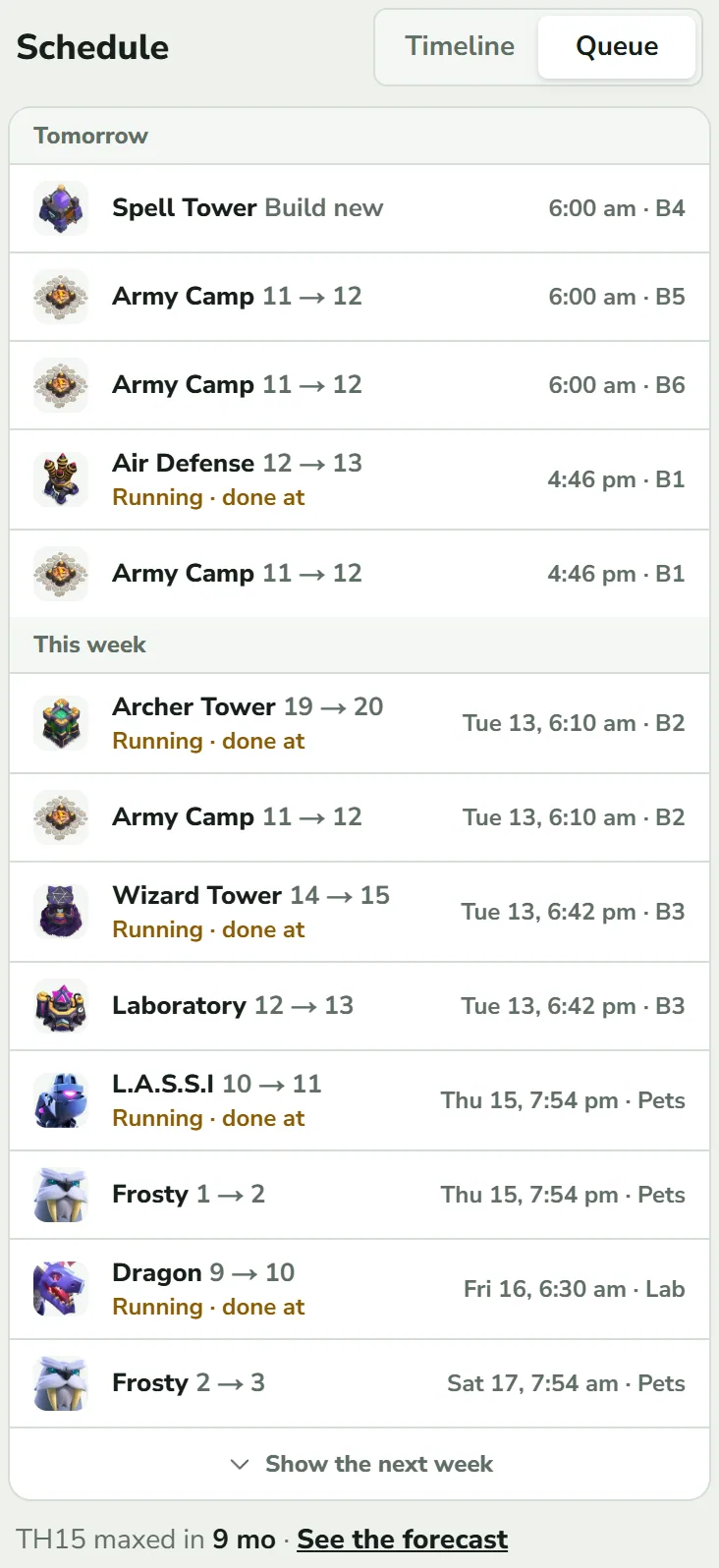
The queue reads straight down in time order, grouped as Today, Tomorrow and This week. Show the next week adds one more week each tap. A step that has not started stands at the moment it starts, which is when you have to act. A running step says Running · done at and stands at its finish. On the right you read the time and the worker, such as “6:00 am · B4”. A line like “after Laboratory 13” says what a step waited for.
Timeline: the whole plan at a glance
- Lanes. One per builder, B1 up to B6 (five builders, six with B.O.B.), then Lab and Pets. A Goblin gets a temporary lane while he is hired. A block is as wide as the step is long, so narrow blocks lose their label first. Tap one to open the step.
- Zoom. The chips 1 week, 1 month and 3 months set the window: read single steps in the week, and use the month to see how full the plan is. Swipe or drag to move it, pinch or use the mouse wheel to zoom down to the hour. A Now button brings you back after you move away.
- Colours. Builder, Lab, Idle (red, dashed), Offline (grey columns) and Clan War League (dashed gold band) are named in the legend. Events you entered get a dotted band with their name.
- Grey dashed lines. A thin line across a gap, labelled with a building when there is room, says what the step waited for.
- Round portraits. The Builder's Apprentice and the Lab Assistant, drawn on the upgrade the planner sends them to.
- Potions. A potion in your plan is a round picture at the hour you drink it, with a black number when several are drunk together. A dotted band runs down every lane it speeds up, for as long as it lasts, and a green “−11 h” on a block is the time the potions take off that step. Tap the picture to open it. Books, hammers and gems get marks too; the boosts chapter explains them and pictures a timeline with potions.
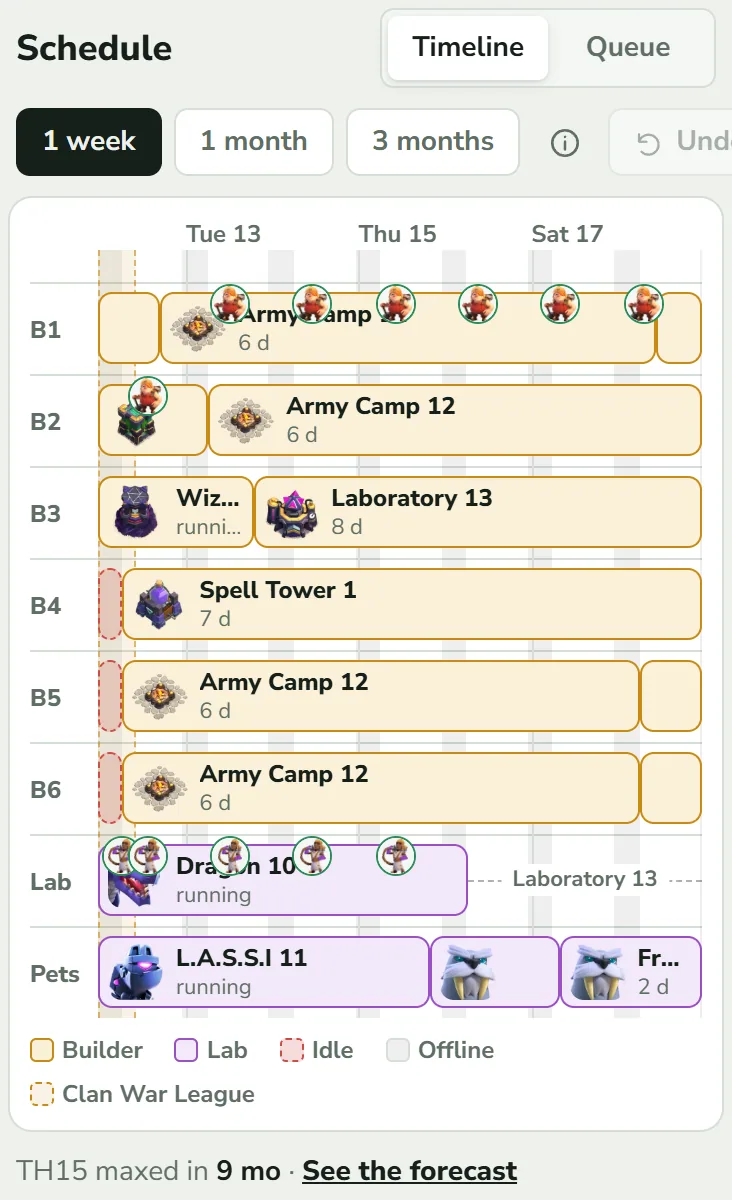
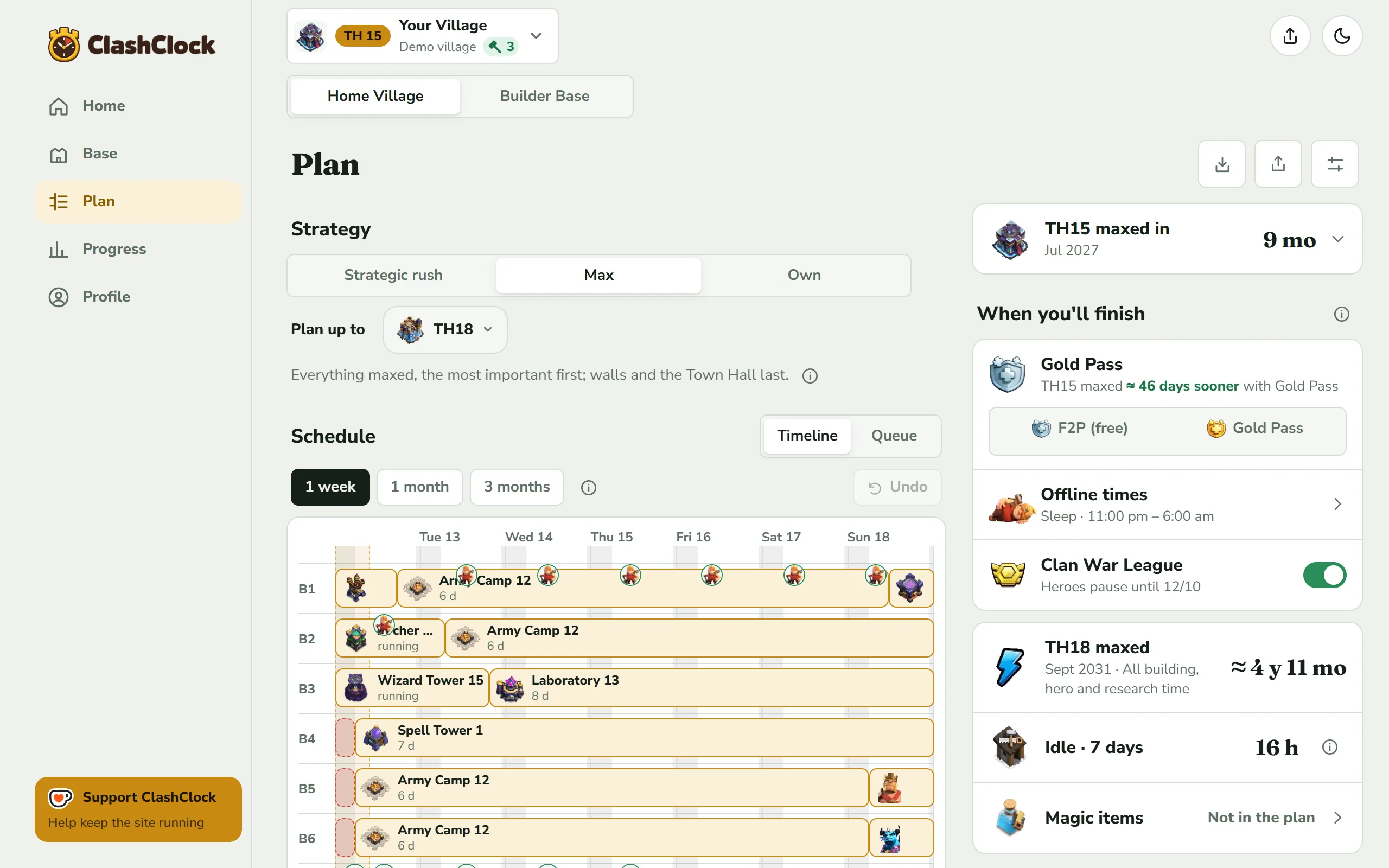
How to read a plan: the 1-week picture
The picture was taken inside the sleep window, which is why it shows red blocks. They appear only when a worker falls free during your offline hours. Looked at in the evening, the same village shows none: a builder that is free while you are online starts its next step as soon as it can.
- B4, B5 and B6 begin with a dashed red block. Those builders are free, but the picture was taken inside the sleep window, so nothing may start. The queue agrees: their first steps read 6:00 am.
- B1's Army Camp 12 runs 6 d with a row of round portraits above it. They are the Builder's Apprentice, sent to this upgrade once a day.
- B3 builds Laboratory 13 for 8 d, and in the Lab lane a grey dashed line labelled Laboratory 13 follows the running Dragon. The next research needs that level, so the lab waits. This gap is a prerequisite, not idle time.
- Pets run back to back, L.A.S.S.I first, with no gap.
Open a step
Tap a block or a queue row. The sheet shows the step's level (New build or “Level 9 to 10”), its price and time with your boosts counted, and the boxes Start and Done. A step that starts later than its worker was free says what it waited for: a building level, loot or a storage upgrade. A Laboratory or Pet House step says whether it comes from your priorities or the default recommendation.
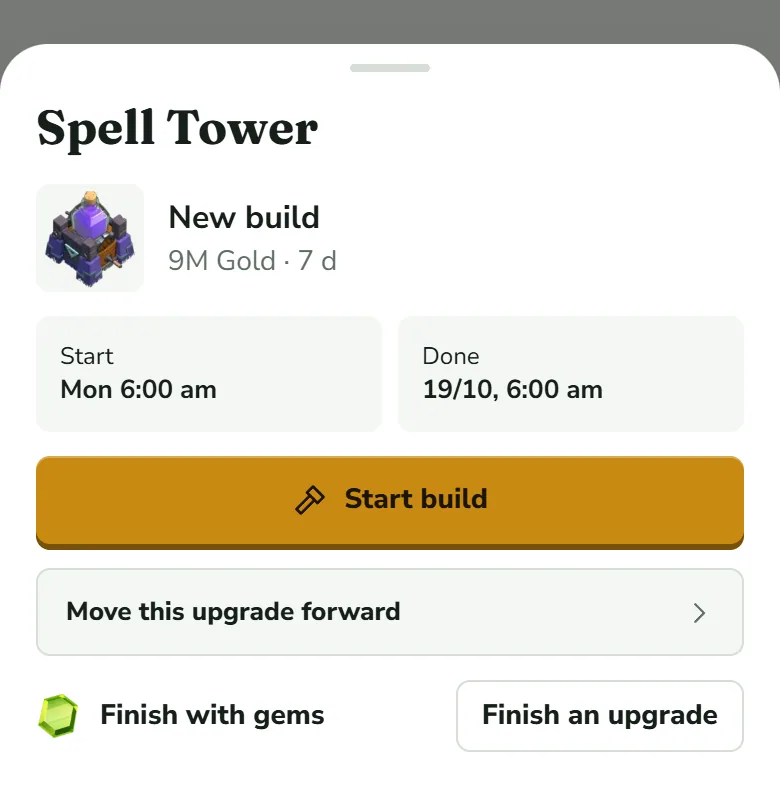
- Start build or Start upgrade appears only when the game would let you begin this minute: a worker is free, the building stands at the right level and its requirements are met. It can show while the plan holds the step until you are back online. Tap it after you started the upgrade in the game, so ClashClock tracks its timer.
- Move this upgrade forward (Rush and Max) puts the step first; hero goals and the league pause still apply. Confirm with Move forward & recalculate. It is not offered for a running step, research, walls or a B.O.B. step. A line Customized with Back to preset then appears under Strategy, and Plan setup lists each change with Take back.
- Set aside belongs to an Own plan. In Rush and Max the way to leave a step out is to switch to Own. A step you added or pulled forward shows a red link, Remove this step and higher selected levels, which takes your choice back.
- Hero steps have a hero goal row, research steps a row for your Laboratory or Pet priorities, and the gem finish and book or hammer rows are covered in the boosts chapter.
Every hand edit on the tab goes into one Undo chip, beside the zoom chips on the timeline and above the queue.
Own plan: you set the order
Own adds nothing by itself: no research, no pet upgrades, no Goblin hire, nothing held for loot. An empty Own plan is empty. The line under the buttons still reads as if research and pets were added for you. In practice only your steps run, so add the Laboratory and Pet steps you want.
Switch to Own
Tap Own. A gold button with the upgrade icon appears in the title bar (it carries the label Add upgrade on wider screens), and Builders joins the views.
Add upgrades
Add upgrade opens “Pick your goals. We fill in the prerequisites.” Tap Apply selection. On an empty plan, Take suggestion (Max) copies the first 15 builder steps a Max plan would take.
Give steps to workers
Everything you add lands in Not placed. Give each step to a builder, the Lab or the Pets: drag it on a wide screen, or tap it on a phone and choose the worker. Fill free builders hands each step to the worker that runs out of work first. On a wide screen Not placed is a tab beside Forecast.
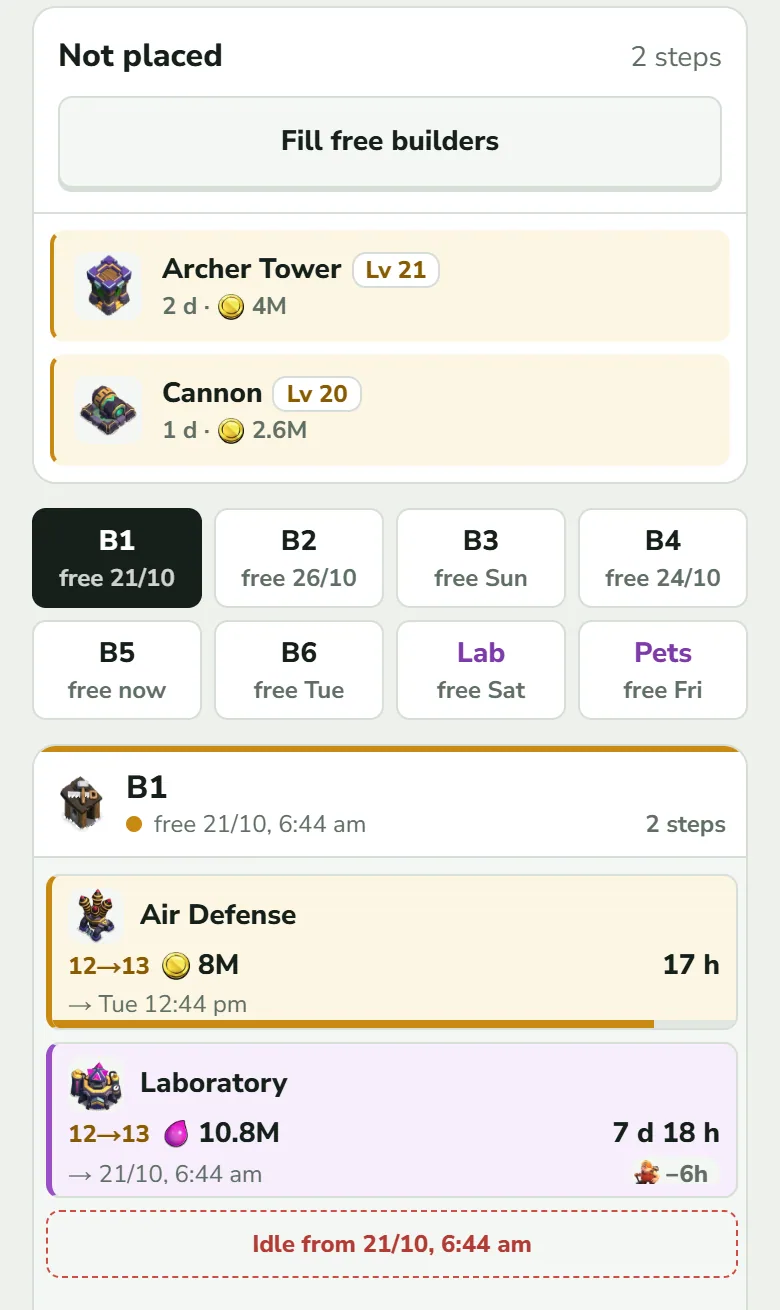
Not placed holds the steps nobody has been given. The worker buttons show when each one runs out of work; tap one and its box lists its steps in order and ends with “Idle from …”. Check the end date
Forecast shows Own plan finished with the date your list ends.
A building's levels always run in order. A drop that would make a step wait for itself, or that no storage in your plan could pay for, is refused with a message. Each worker's queue in the Builders view shows idle stretches (“Idle 13 h · you are offline”) and “Idle from …” after its last step.
Clan War League and hero upgrades
A hero in the middle of an upgrade cannot fight. With the Clan War League switch in Forecast on, which it is by default, no Home Village hero upgrade is planned into the league. ClashClock assumes the league starts on the 1st of each month at 08:00 UTC and lasts 11 days. That rule is typed in, not read from the game, so switch it off if your league runs differently. One hero can ignore it through Hero goals in Plan setup.
Forecast: when you will be done
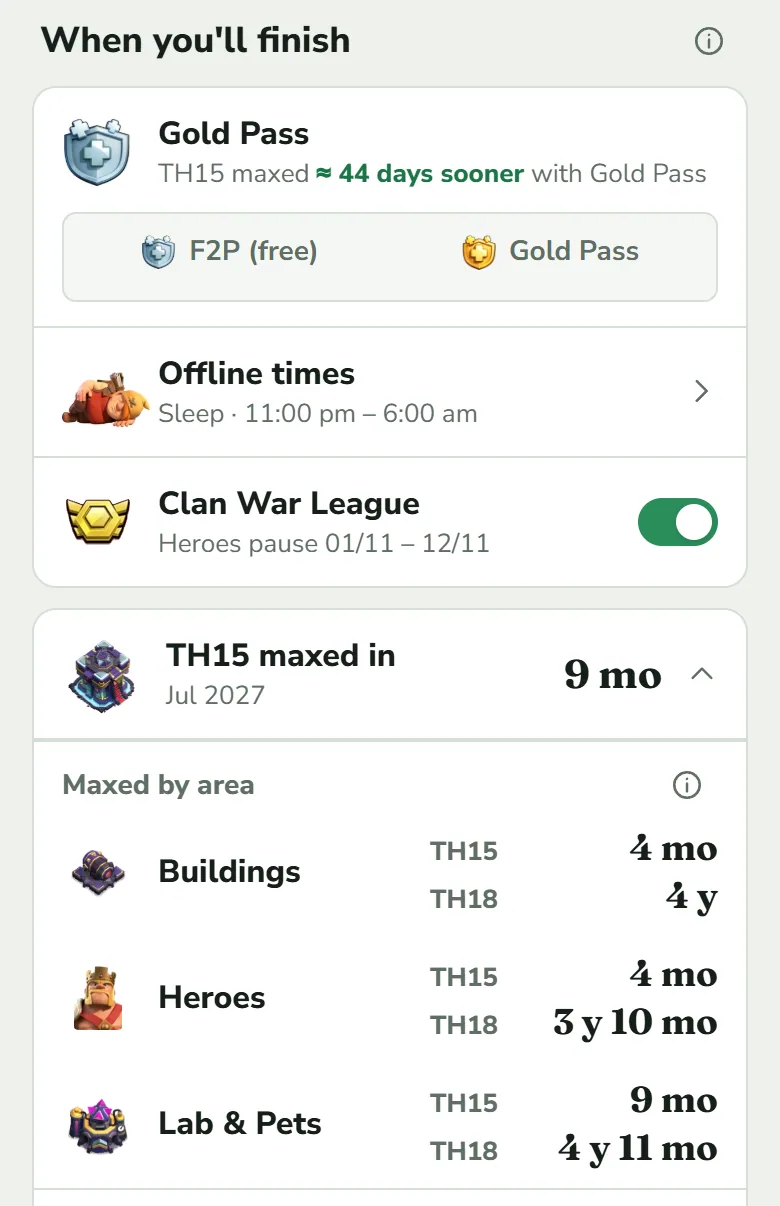
When you'll finish puts each setting right above the dates it moves. Its (i) says what they count: builders, offline hours, Gold Pass boosts and potions. Hero equipment and farming time are not included.
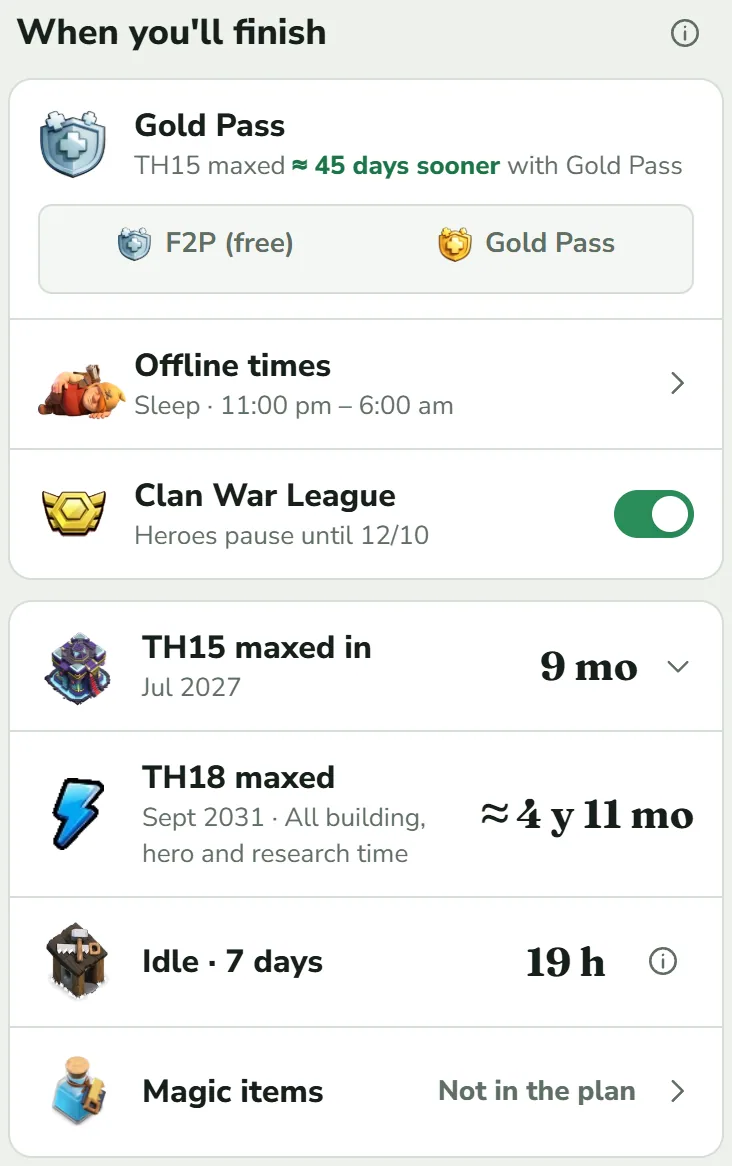
- First date. Max and Own read “TH15 maxed in …”, when everything of your current hall is done. Rush reads Next Town Hall ready in …: the time until the planner starts the Town Hall upgrade, not until the new hall stands. Whichever strategy you use, tap this row to unfold Maxed by area, shown below.
- Second date. Rush shows when the hall you plan up to is reached, Max when it is maxed. Far away dates show a month and a year.
- Idle · 7 days. Builder time lost to your offline hours in the next seven days.
- Magic items. What your potions, books and hammers are worth, or “Not in the plan”.
- Resources needed. For Gold, Elixir, Dark Elixir and Gems: the next 24 hours, the next start, and a weekly average. Tap a row for the upgrades behind the next start. Farming and resources in Plan setup, off until you switch it on, lets the plan count the loot you farm as an estimate you can edit.
Maxed by area has one line each for Buildings, Heroes and Lab & Pets. A line shows how long until that area is maxed, for the hall you are on, and under it for the last hall the plan climbs to (the newest hall on Rush) when that is further up. Buildings and heroes share your builders; the Laboratory and the Pet House work on their own. The figures come from the Max plan with your builders, offline times and boosts, and on Max and Own the longest of the first column is the lead date.
Setup, sharing and starting over
Three icons sit beside the title. Update village opens the import. Share this plan gives you a code and a link, and reads a pasted one: it says how many upgrades would land in your village, and Use this plan replaces this village's plan, with an undo. A code carries only your own steps (with the builder each one is tied to), hero goals, research order and the strategy.
Plan setup holds what you change now and then: Laboratory and Pet priorities, Hero goals, the Re-Engagement Boost, Events, workers and gems, Farming and resources, and Keep a builder free for walls. After you change a Rush or Max plan by hand, it lists each change and ends with Back to preset. In an Own plan that button reads Reset plan.
Common questions
Why is a step missing?
- It is running (Running · done at), or finished and waiting on Home for Set to level N.
- It lies beyond Plan up to, or far ahead: Max puts walls and the Town Hall last. Use 3 months or keep tapping Show the next week.
- Rush leaves defences for last and never upgrades collectors and mines. Hero equipment is never scheduled: its upgrades cost ore and take no builder time. The ore calculator is in Progress: how far to max.
- A line “N selected steps have no date yet” means a step you chose cannot be scheduled: a prerequisite is missing, a building is excluded or the league rule is in the way.
Why is a builder idle?
- A red dashed block is time lost to your offline hours. It is all the Idle figure counts.
- A grey dashed line with a name is a wait for a building level, a storage upgrade or, when you plan by resources, loot. It is not idle time.
- A hatched Reserved for walls lane is the builder you kept free for walls.
- In an Own plan, “Idle from …” means the builder has no more steps.
Why did the plan change after I imported?
The export is the truth for levels and running timers. Your own steps for levels that are already done or running leave your list (a running step still shows in the queue as Running · done at), the rest of your steps and edits stay, and the planner recalculates. If the game and ClashClock differ by a few minutes, the plan shifts by that much. It also drifts a little on its own, because it recalculates every minute and a new Gold Pass level shortens the steps that start after it. When a timer looks wrong shows how to correct one.
Open the demo village, tap Plan, and try the strategies, the timeline and the Forecast dates.
Open the demo villageTry it on your own village
Paste your village export and everything in this guide works on your own builders, timers and plan. It is free, needs no account and runs in the browser.
Useful? Help keep ClashClock running.
ClashClock is built and run by one person. Support on Ko-fi pays for the hosting, the database and the reminders it sends.